What you'll achieve
You'll create a new policy record and open it as a draft, ready for further writing and review. Creating the record does not publish the policy and does not ask anyone to attest it.
Who this is for
This guide is for an Organisation Collaborator with permission to create policies. A Collaborator is a licensed Backstory user. What you can do within the platform still depends on the roles and permissions your organisation has assigned to you.
Before you start
Have these details ready:
- a clear title;
- a short statement of purpose;
- the policy type;
- the review frequency;
- the person or team that will own the policy; and
- any internal reference you want to use as the policy identifier.
You can start from a template or from a blank policy. A template is a starting point, not an approved policy. Check every part it adds before the policy moves beyond draft.
Understand the policy catalogue
The catalogue shows each policy's owner, version, lifecycle state, linked controls, review position and attestation coverage. It is a useful place to check whether a similar policy already exists before creating another one.
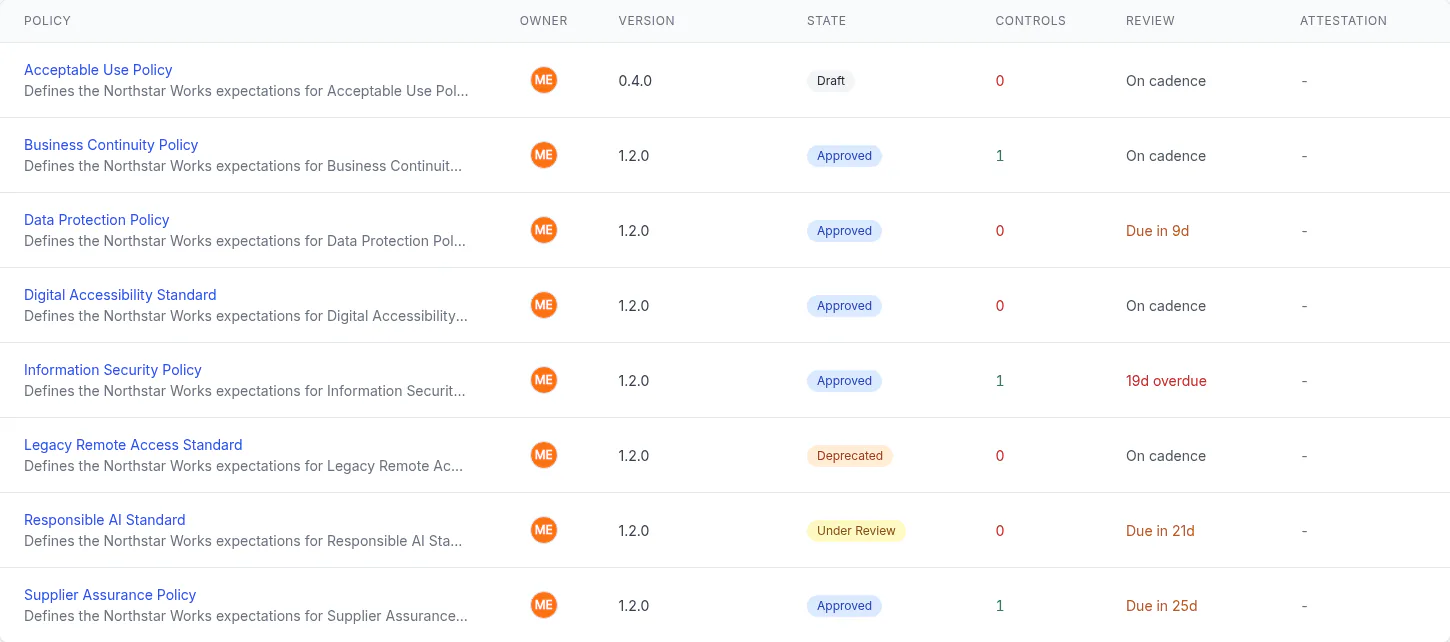
Check the catalogue before you create a policy. A duplicate can divide ownership and make it harder for people to know which version governs their work.
Create the draft
1. Open Policy Management
Open Policy Management Center. You can review the Catalog first if you need to check the existing policy set.
Choose Create Policy in the page header. Backstory opens Create New Policy.
If you cannot see Create Policy, you may not have permission to create policies. Ask your organisation administrator to check your role rather than asking them to share an account.
2. Choose how to begin
Under Start from a Template, choose a template if one fits the purpose. Leave the selection empty to start with a blank policy.
If you choose a template, review all of its content and fields. Your organisation remains responsible for deciding whether the result is suitable.
3. Add the basic information
Complete the required fields:
- Policy Title: use a name people will recognise in the catalogue and in an attestation request.
- Purpose: explain what the policy is for and what organisational need it addresses.
- Policy Type: choose the closest governed-document type offered by your organisation.
- Review Frequency: choose how often the policy should return for review.
You can also add a Policy Identifier if your organisation uses an internal naming scheme.
The policy is created as a draft. You do not choose a published or approved state in this form.
4. Add governance details
Add an Effective Date if one has been agreed. Use the date field to record the decision, not to bypass review or approval.
Use Penalties (Optional) only when the wording has been agreed with the appropriate policy, people and legal owners. Avoid adding consequences speculatively.
5. Name the accountable people
Choose an Owner Team and Policy Owner when you know who will maintain the policy. Clear ownership makes later review and questions easier to route.
If ownership is not settled, do not guess. Record the draft, then resolve ownership before publishing.
6. Record the training requirement
Tick Mandatory training required only when the organisation has made that decision. This field records the requirement; it is not a substitute for planning or delivering the training.
7. Create the policy
Review the form, then choose Create Policy.
Backstory creates the draft and opens the policy page so you can continue working on it.
Check it worked
Confirm all three results:
- the new policy page opens;
- the status is draft; and
- the policy appears in the catalogue with the title you entered.
Creating the draft is not publication. It should not appear in a collaborator's pending attestation list unless a later governed step creates an active attestation requirement.
If something goes wrong
| What you see | What to do |
|---|---|
| Create Policy is missing | Ask your organisation administrator to check your role and effective permissions. |
| The form will not submit | Check Policy Title, Purpose, Policy Type and Review Frequency. They are required on the live form. |
| A template added unsuitable content | Keep the policy in draft and edit the content before any review or publication decision. |
| The wrong owner was selected | Keep the policy in draft and correct the ownership details on the policy page. |
| A similar policy already exists | Stop and agree whether to update the existing policy or keep a separate document. Do not publish competing versions without a clear decision. |
Human judgement and governance
Backstory can hold the document, its lifecycle and its evidence. It cannot decide whether the policy is lawful, proportionate or right for your organisation. Involve the people affected by the policy, and obtain the review or approval your organisation requires before publication.
Do not include passwords, secret keys, health information or unnecessary personal data in a policy draft.
What's next
Continue on the policy page to write or import the policy content, confirm ownership, link relevant controls and prepare the draft for review. Publication and attestation are separate governed steps and should have their own reviewed guides.
Need help?
Contact your organisation administrator if an action is missing. For a product problem, use your organisation's Backstory support route and include the policy title, the page you were on and the action that did not work.